The familiar form era
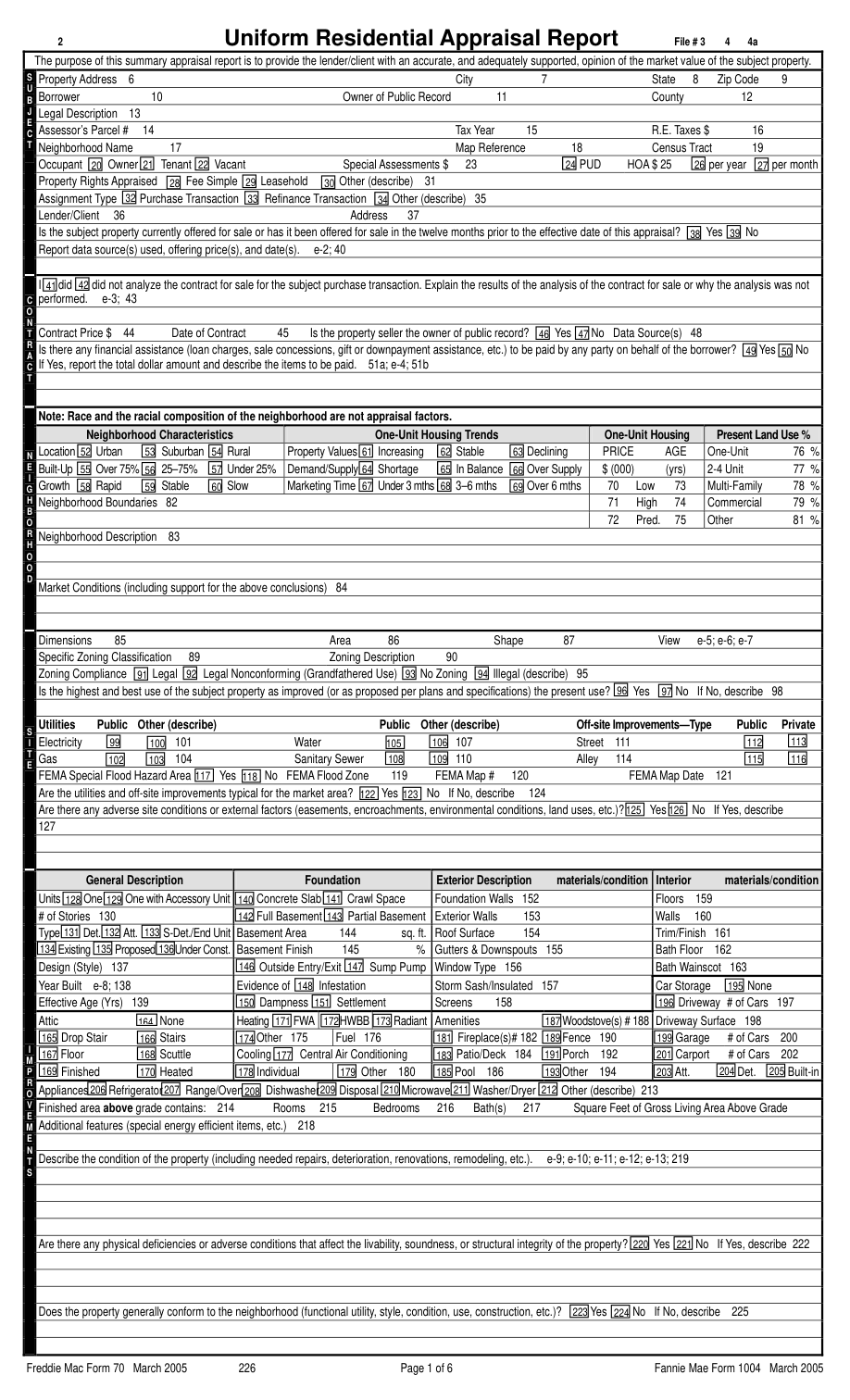
The March 2005 forms became a familiar frame for appraisal reporting: labeled spaces, a sales grid, and supporting addenda. The form shown here is the legacy Form 1004, not the beginning of appraisal history. [1]
A new chapter in property reporting
Every property has a story. Follow the evolution of the appraisal report—and see how UAD 3.6 gives that story more room.
Scroll to explore About 14 minutesBefore the redesign
The March 2005 forms became a familiar frame for appraisal reporting: labeled spaces, a sales grid, and supporting addenda. The form shown here is the legacy Form 1004, not the beginning of appraisal history. [1]
UAD standardized selected formats, definitions, and responses across Forms 1004, 1073, 1075, and 2055. For covered Fannie Mae appraisals, the requirement applied to effective dates on or after September 1, 2011. Electronic submission gained a common gateway: UCDP. [2]
Fannie Mae and Freddie Mac began the redesign with industry input. The ambition: a reporting structure that follows the property, aligned with the MISMO 3.6 data standard. [3]
The turning point
UAD 2.6 already carried structured data. UAD 3.6 expands that structure and makes the report itself dynamic. Its sections follow the characteristics of the property and the assignment. [3]
Eight ways the new report brings the property into sharper focus. Scroll through official report excerpts, compare the reporting approaches, and follow each detail into the field guide.
01 / The opening page
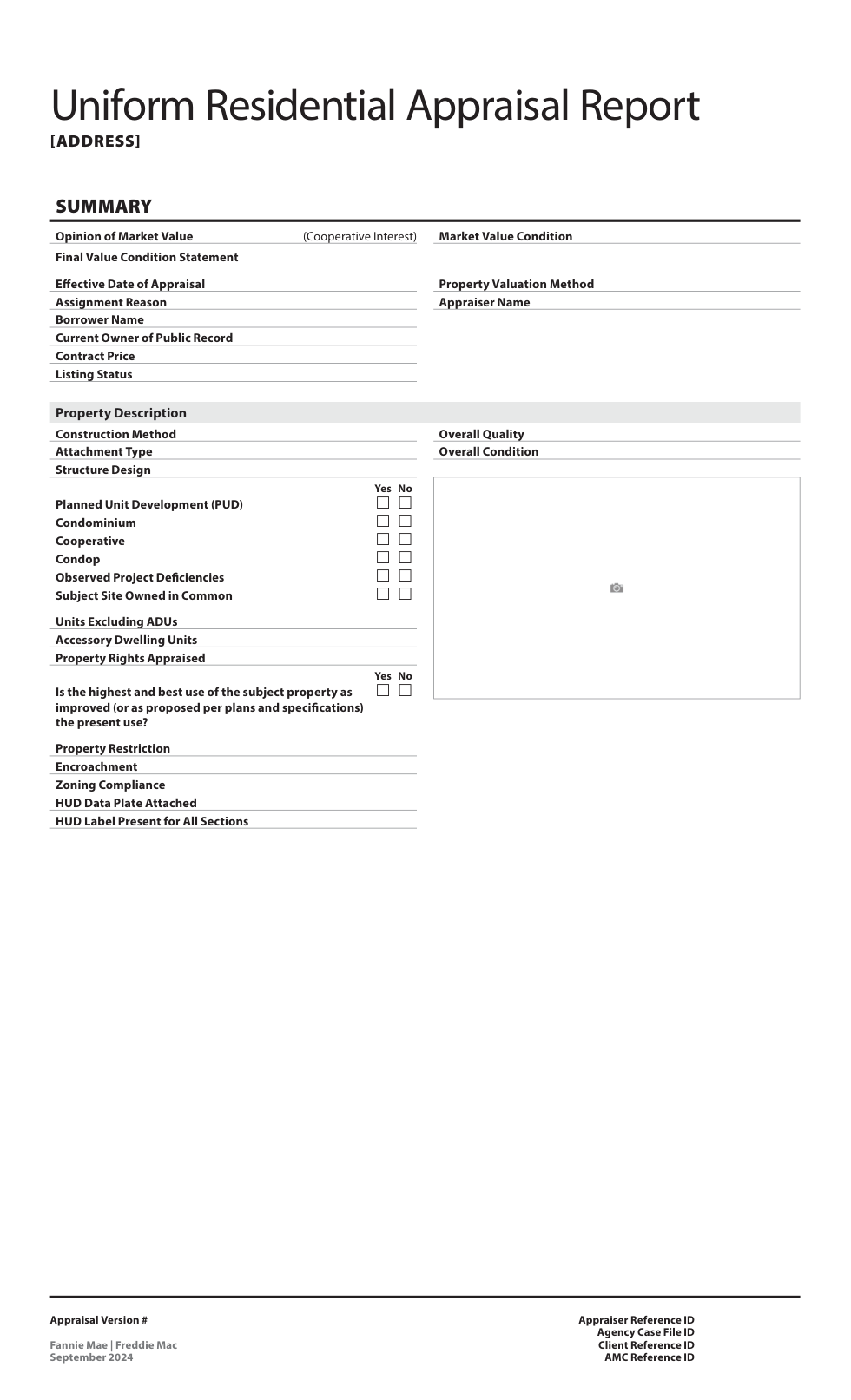
The redesigned report opens with a Summary that brings the value conclusion, assignment context, and property characteristics into one starting point for review.
Close-up 1 / 2
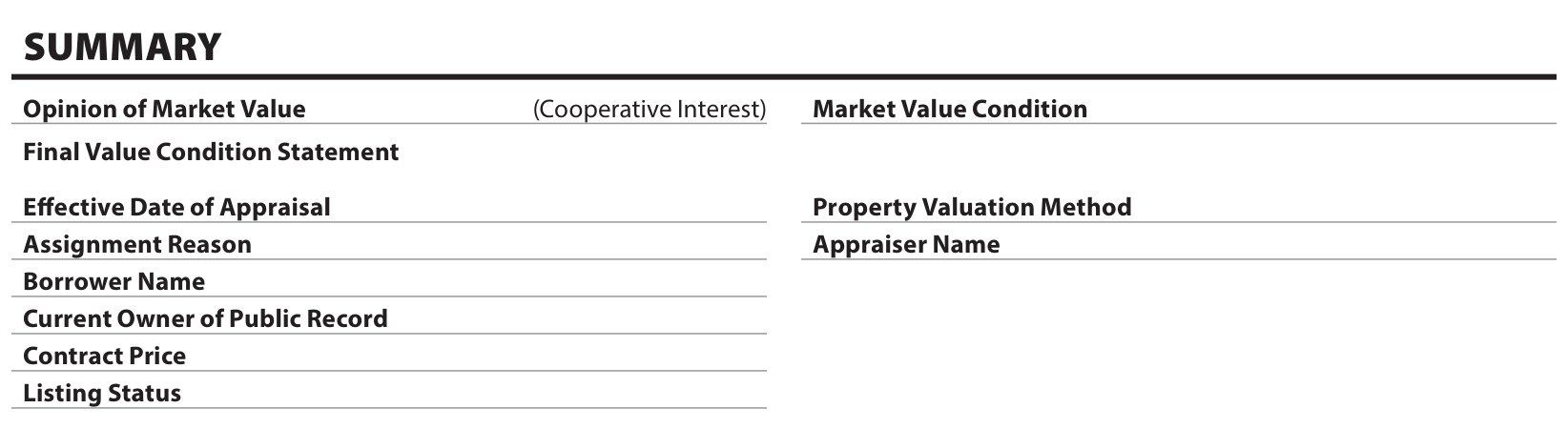
Opinion of Market Value sits alongside Market Value Condition. The opening page also presents the effective date, assignment reason, valuation method, appraiser, and relevant contract and listing information. A subject-to conclusion needs to be read together with its conditions; a dollar amount alone does not tell the whole story.
Explore field 1.009 F-1 · Summary, pages 26–27 ↗Close-up 2 / 2
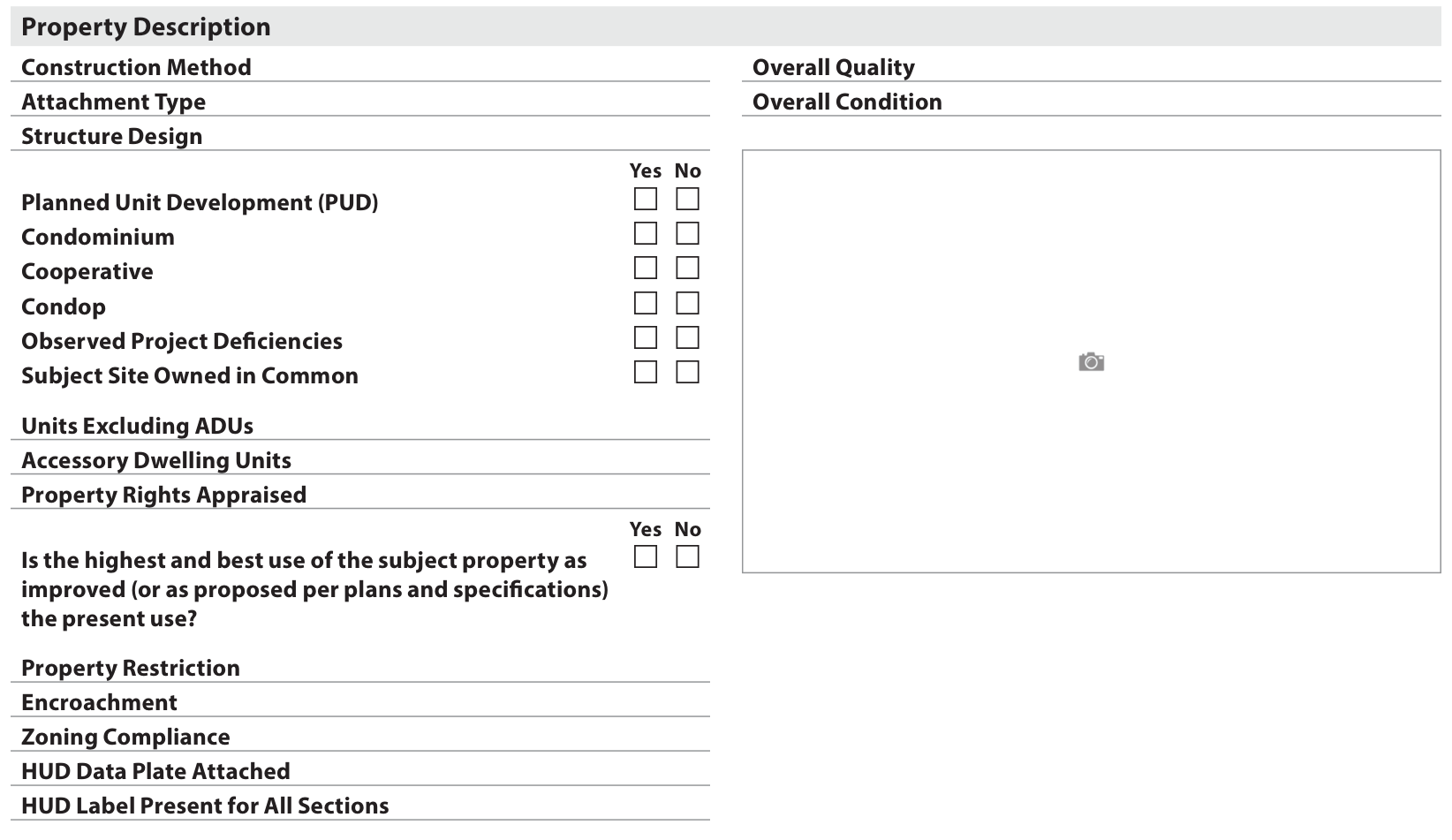
The Property Description brings together construction method, attachment and design, project characteristics, unit and ADU counts, property rights, and overall quality and condition. This makes it easier to establish what is being appraised before moving into the details.
Explore field 1.030 F-1 · Summary property details, pages 28–30 ↗Start with the conclusion, then follow the information back to its supporting section. Summary is a starting point, not a substitute for the full appraisal.
On legacy Form 1004, readers move between the subject and improvements sections and the later reconciliation to assemble this opening picture.
 View legacy source ↗
The Summary redisplays information from the underlying report sections. It is a quick reference, with the detailed analysis still in its original context.
02 / Contextual narrative
The General Addendum gives way to commentary fields within the report’s sections. The reader can follow the detail and its explanation together.
Close-up 1 / 2

The Site section puts View, Range of View, and Impact together, with View Commentary directly below. The narrative can support the recorded details or explain something important about the view that those fields do not capture. It is a concrete example of commentary remaining close to the subject it explains.
Explore field 4.042 F-1 · Views and commentary ↗Close-up 2 / 2
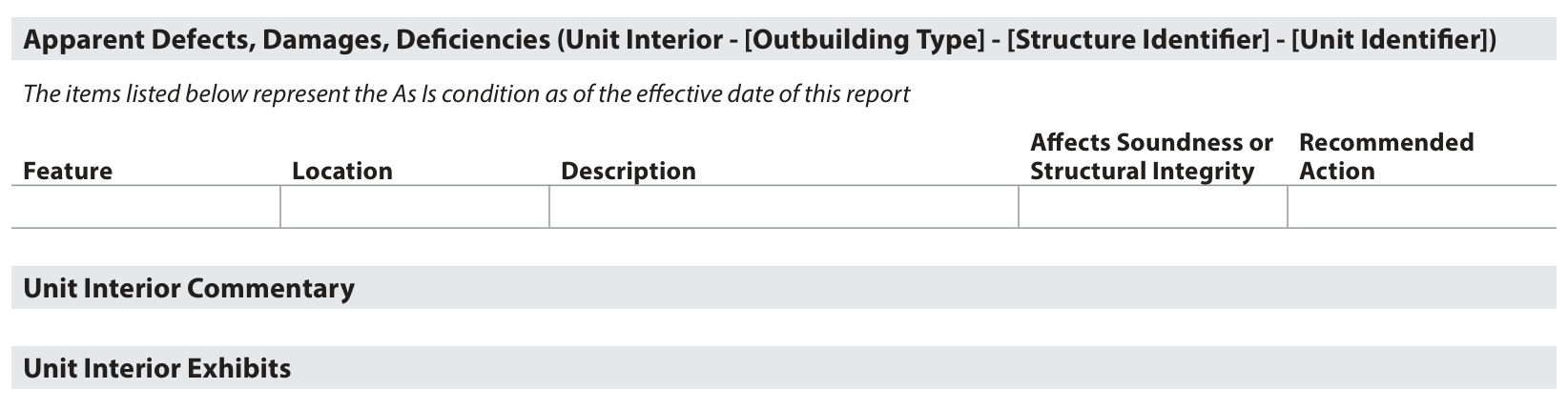
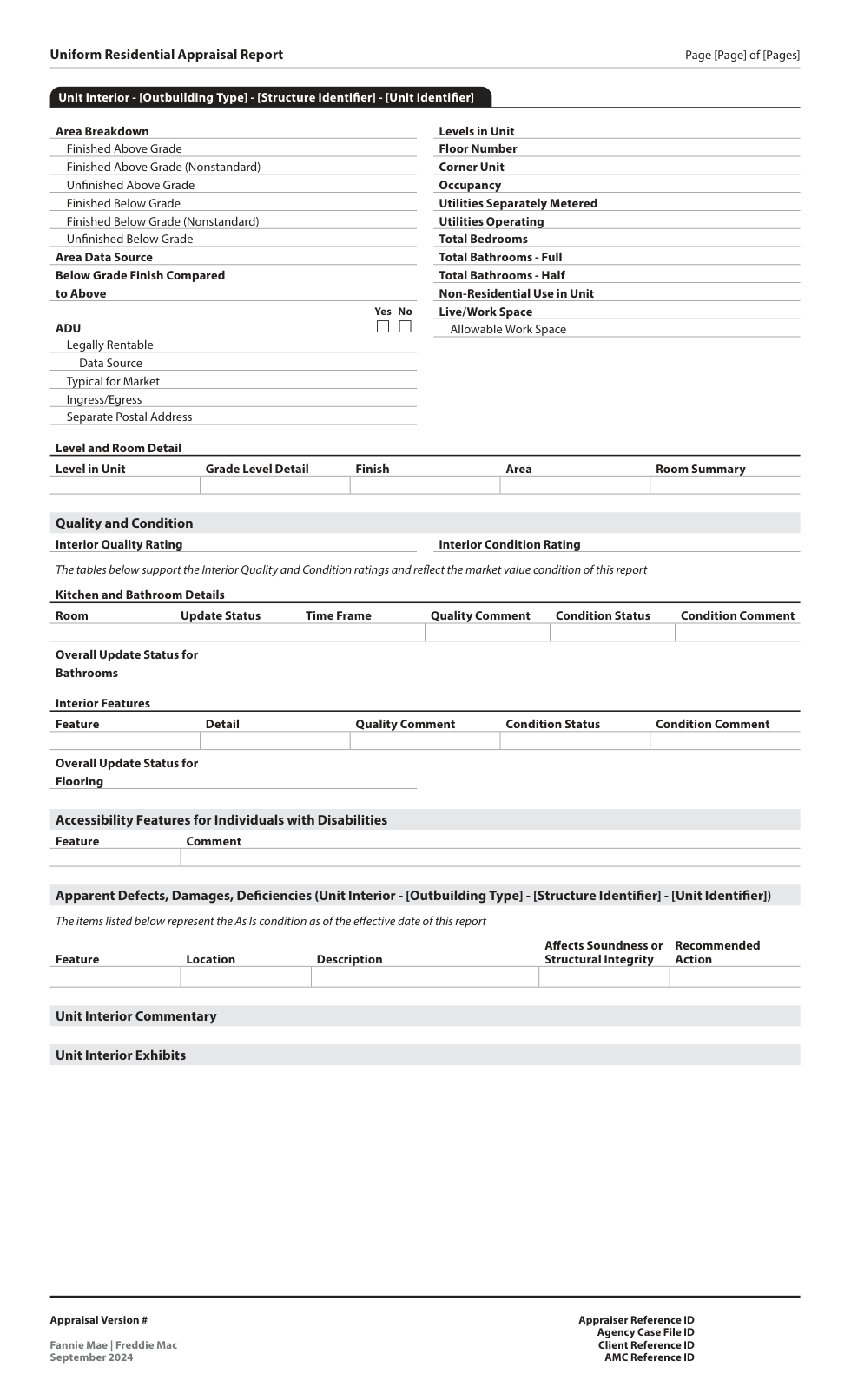
The Unit Interior section records apparent defects with their feature, location, description, effect on soundness or structural integrity, and recommended action. Unit Interior Commentary and exhibits follow. A reviewer can move from the observed issue to its explanation without first reconstructing the connection from a general narrative.
Explore field 10.056 F-1 · Unit Interior defects and commentary, pages 147–148 ↗Read the structured answer first, then the nearby narrative. Check whether the explanation supports the reported impact and addresses information the defined fields cannot capture.
Additional discussion could sit in a General Addendum, requiring the reader to connect it back to the relevant form field.
A comparison of reporting structure. No direct legacy excerpt is shown for this topic.
Specific fields and sections provide space for commentary. Some explanations attach to an individual item; others address a whole section.
03 / Condition and quality
The C1–C6 and Q1–Q6 scales remain, with refined definitions and a more detailed structure for explaining the property’s condition and quality.
Close-up 1 / 2
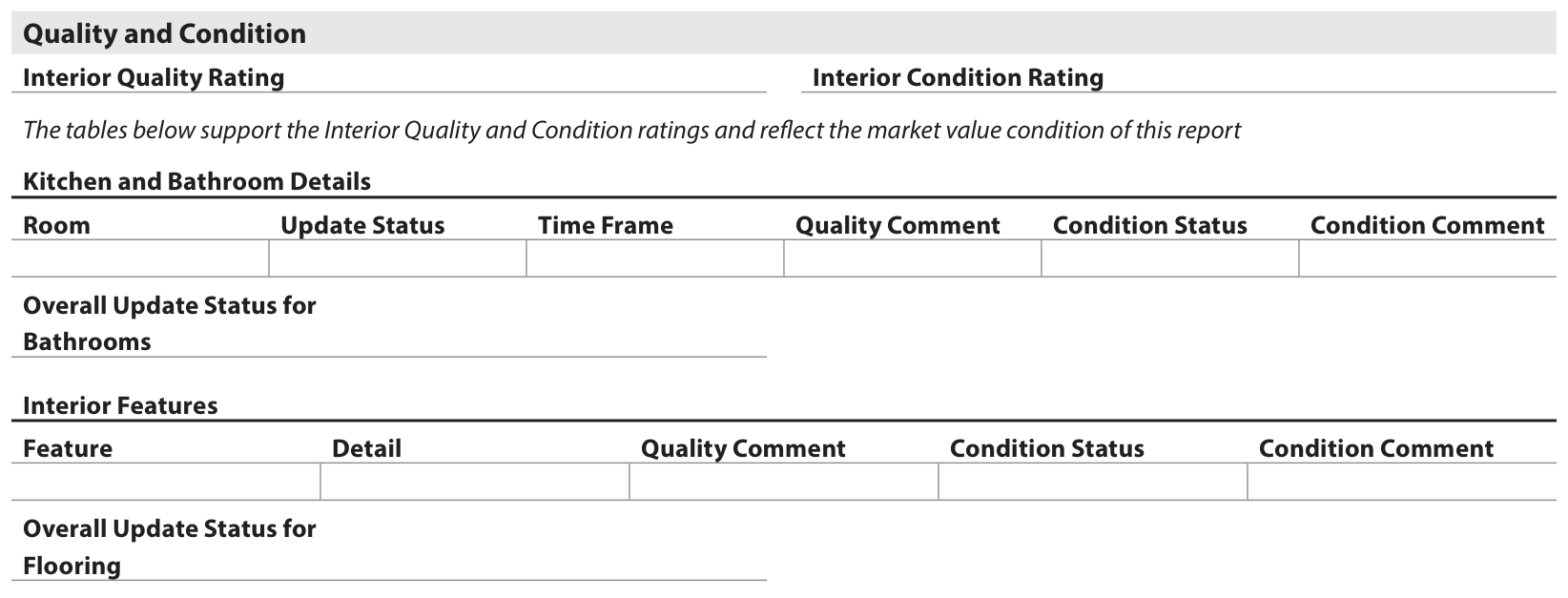
Unit Interior separates Interior Quality Rating from Interior Condition Rating. Kitchen and bathroom entries add update status, timing, quality comments, condition status, and condition comments. Interior features have their own supporting detail. That structure gives reviewers more evidence for understanding the rating selected.
Explore field 10.035 F-1 · Interior ratings and detail, pages 136–141 ↗Close-up 2 / 2
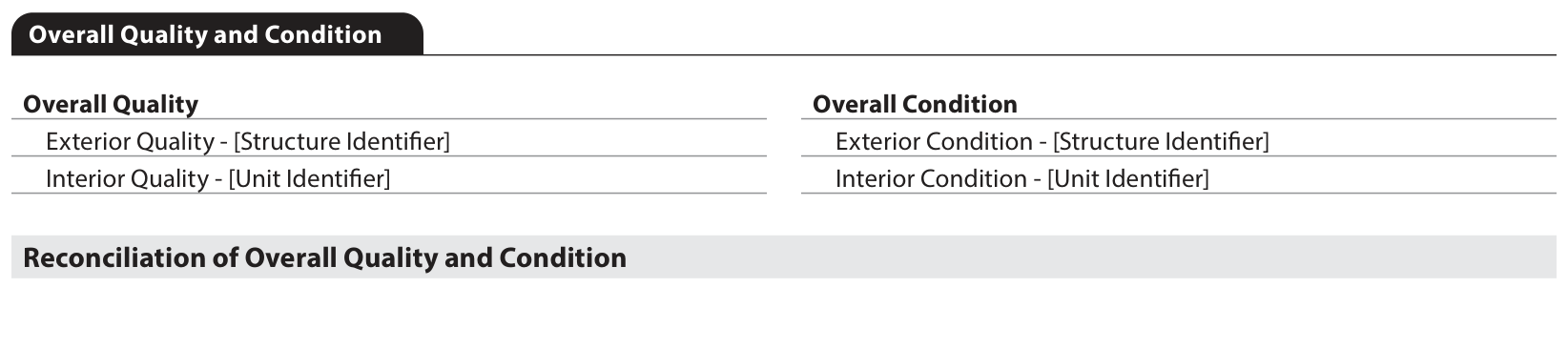
Overall Quality and Condition collects the overall ratings and the applicable exterior and interior ratings, followed by a reconciliation. Exterior ratings depend on the reporting conditions, including responsibility for exterior maintenance. Interior ratings for ADUs remain in the ADU’s Unit Interior section rather than redisplaying in this overall table.
Explore field 15.010 F-1 · Overall ratings and reconciliation, pages 174–175 ↗Follow the relationship between the component detail and the overall rating. A rating is an assessment, not an arithmetic average of the entries below it.
UAD 2.6 standardized overall condition and quality ratings, supported by descriptions of improvements and their condition.
 View legacy source ↗
Interior, exterior, and overall ratings provide different levels of detail. Supporting feature tables and reconciliation explain how the report reaches its overall assessment.
04 / Accessory dwelling units
An ADU receives a separate Unit Interior section. Its characteristics can be described consistently rather than compressed into a brief reference elsewhere in the report.
Close-up 1 / 2
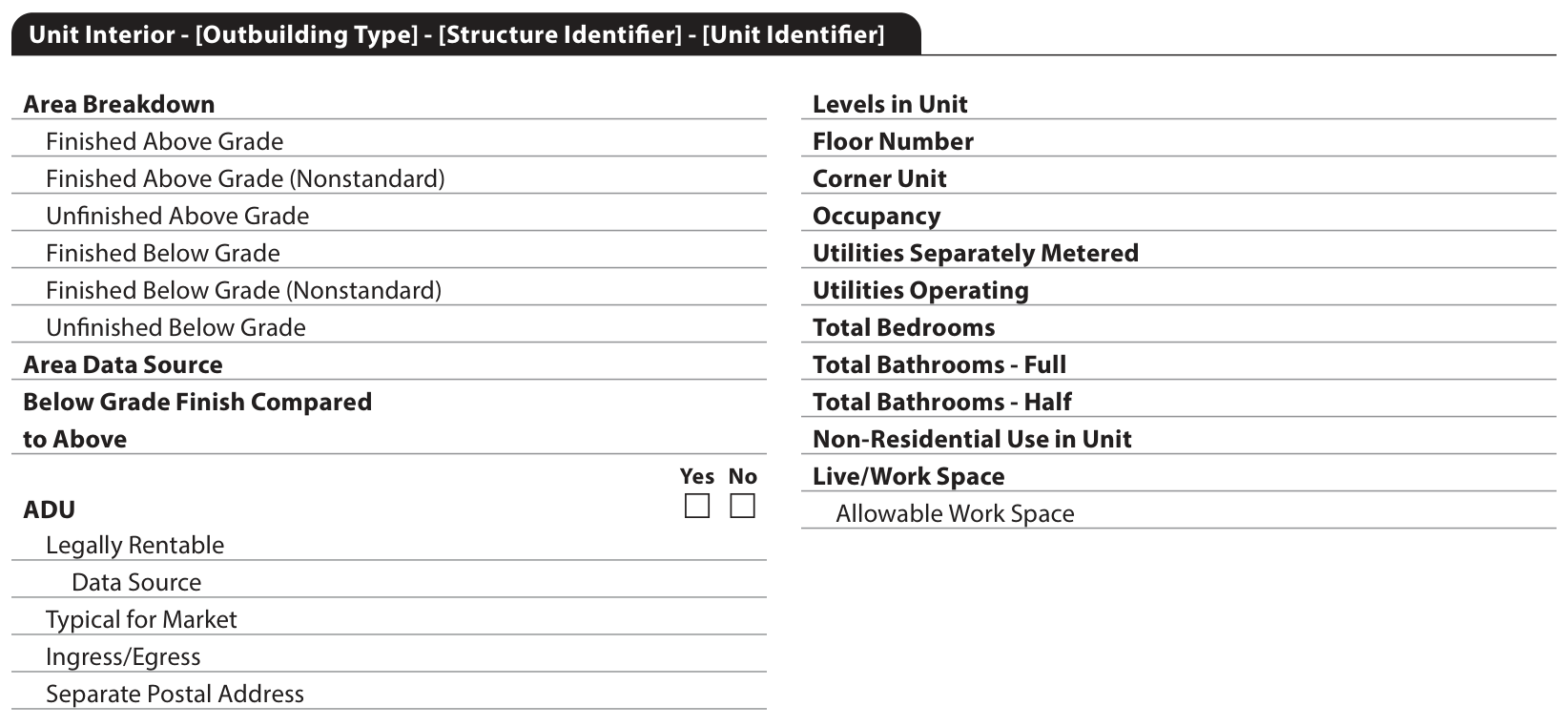
The Unit Interior heading carries the relevant structure and unit identifiers. The area breakdown distinguishes finished and unfinished space above and below grade, including nonstandard finished area. The ADU indicator identifies which unit is an accessory dwelling unit when the subject has one or more ADUs.
Explore field 10.011 F-1 · Unit Interior and ADU identification, pages 127–129 ↗Close-up 2 / 2
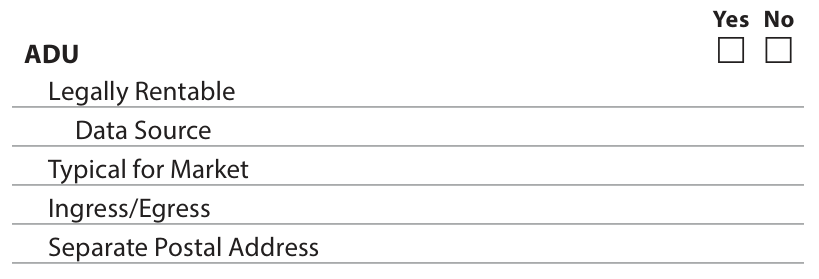
The ADU detail includes whether it is legally rentable and the data source, whether it is typical for the market, ingress and egress, and whether it has a separate postal address. These are distinct facts: a separate address does not answer the legal-rentability question, and a rental statement still needs its supporting source.
Explore field 10.012 F-1 · ADU characteristics, pages 129–130 ↗Identify which unit is the ADU, then review its area, legal rentability, access, and condition in that unit’s own context.
ADUs could be described in the legacy report and supporting commentary, with their detail distributed through the form.
 View legacy source ↗
A repeatable Unit Interior section records the ADU’s area and characteristics, with specific questions about its use and access.
05 / Additional properties analyzed
A dedicated Additional Properties Analyzed Not Used subsection can explain why a property considered in the analysis was not included in the sales comparison grid.
Close-up 1 / 2

The table sits after the reconciliation of the Sales Comparison Approach. It records the additional property’s address, sale date when applicable, status, reason not used, and comment. It can provide context in the initial report or in a reconsideration process.
Explore field 22.17.02 F-1 · Additional Properties Analyzed Not Used ↗Close-up 2 / 2

The available reasons include matters such as condition, quality, dated sale, proximity, site influence, and an ADU. The adjacent Comment field supports the selected reason with additional detail. This gives a reviewer a clearer place to examine the selection decision rather than infer it from the final grid alone.
Explore field 22.17.06 F-1 · Reason Not Used and Comment ↗Look for a property-specific explanation. A standardized reason identifies the issue; the comment should explain why it mattered to this analysis.
The legacy sales grid focused on the comparables used. Discussion of other properties could appear in supporting narrative.
A comparison of reporting structure. No direct legacy excerpt is shown for this topic.
When relevant, a dedicated table identifies additional properties and records the reason and supporting analysis for excluding them.
06 / Energy, green features, and ratings
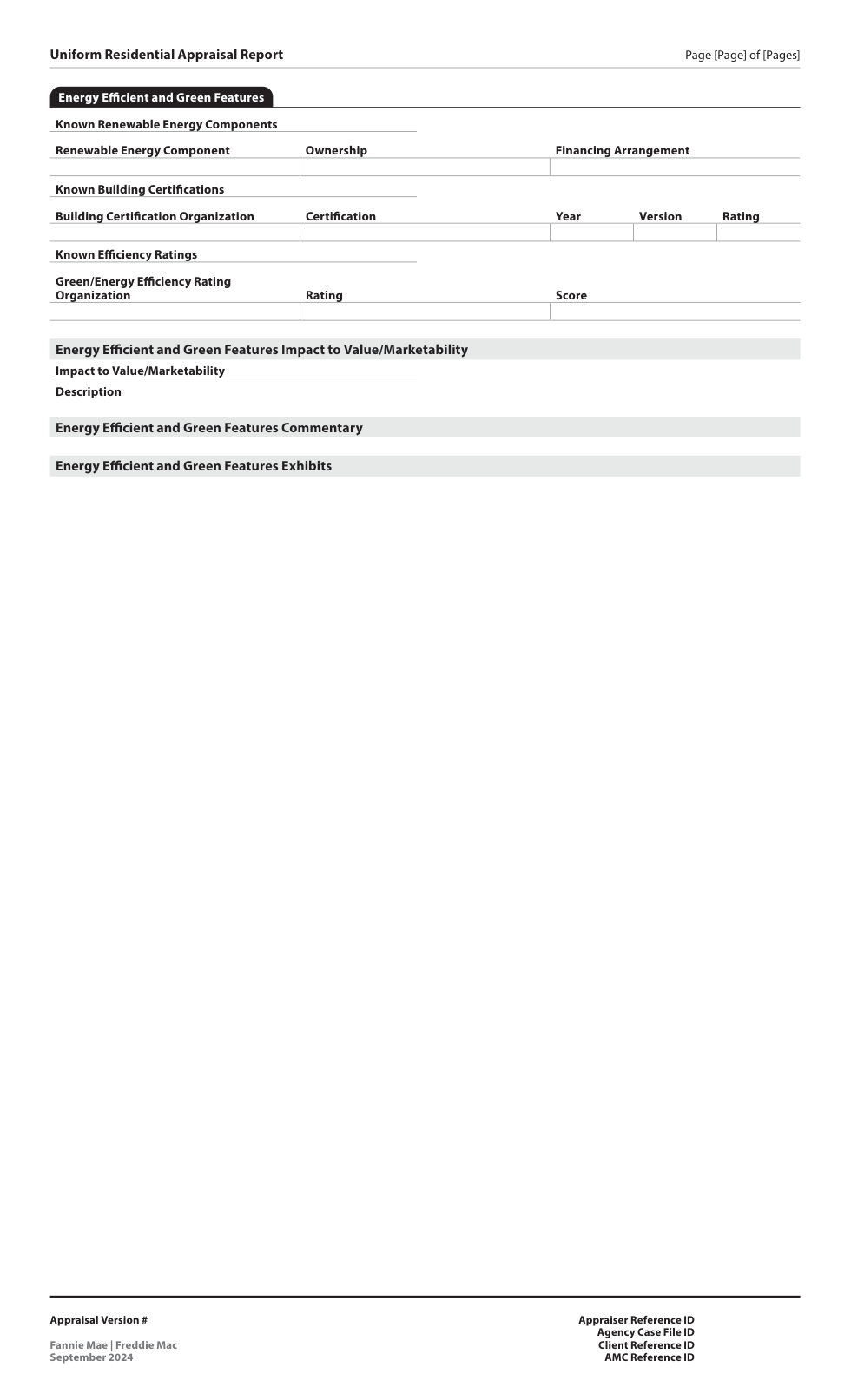
The official section is Energy Efficient and Green Features. It organizes renewable energy components, building certifications, and efficiency ratings, with their impact on value and marketability.
Close-up 1 / 2
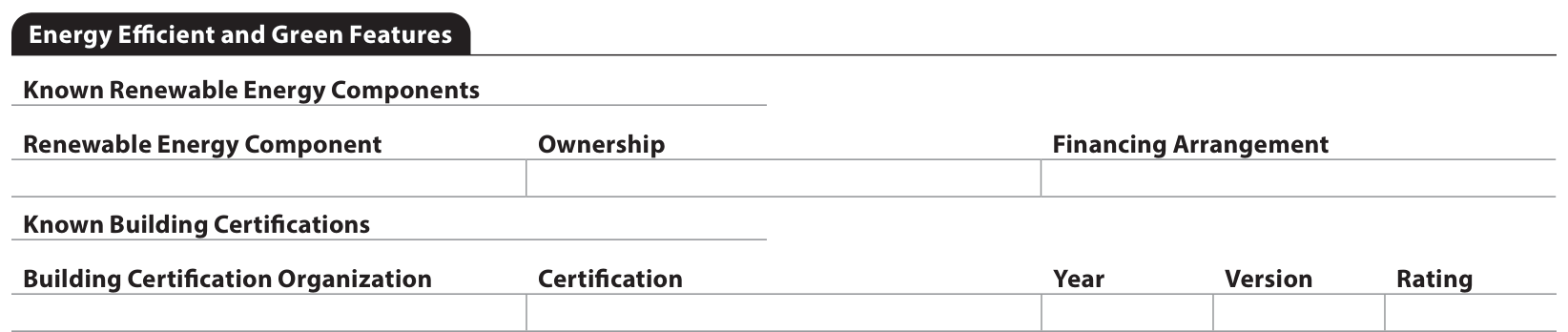
Renewable energy entries identify the component and ownership, including owned, leased, or a power purchase agreement. For an owned component, the report asks whether it has a financing arrangement. Building certifications separately identify the organization, certification, and applicable year, version, and rating.
Explore field 6.002 F-1 · Components and certifications, pages 88–89 ↗Close-up 2 / 2
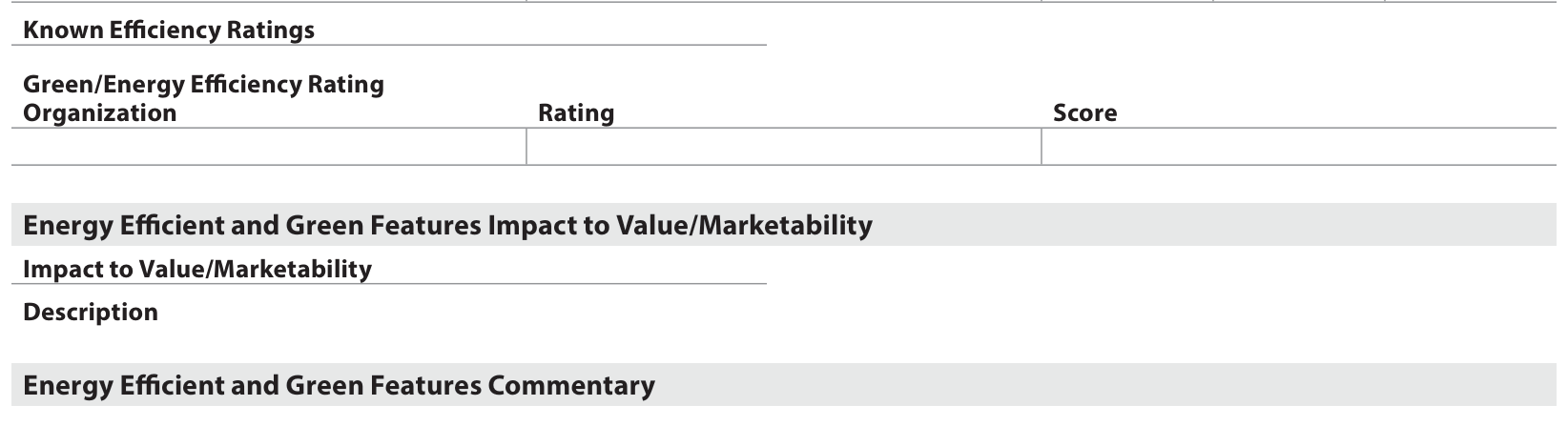
Green Efficiency Ratings identifies the rating organization, rating name, and score. The section then records impact to value or marketability, with a description and commentary. This separates the existence of a rating from the appraiser’s analysis of what it means for this property.
Explore field 6.013 F-1 · Efficiency ratings and impact ↗Identify the program, the rating or score, and the property-specific impact. A certification is evidence of a program outcome, not an automatic dollar adjustment.
Energy-related features could be described in legacy improvement fields and commentary without this dedicated section structure.
 View legacy source ↗
The report distinguishes components, certifications, and ratings, then connects them to an impact assessment and explanation.
07 / Site influence and view
Location and view become more granular. The report separates the influence or view itself from its characteristics and its effect on value or marketability.
Close-up 1 / 2

Site Influence records the influence, its proximity, additional detail, its impact, and a comment. The structure allows the appraiser to explain the relationship between the property and its surroundings. Site Influence Commentary supports the overall discussion when the defined entries need more context.
Explore field 4.026 F-1 · Site Influence ↗Close-up 2 / 2

A view can be full, partial, seasonal, or another described range. The primary-view indicator identifies the view with the greatest impact when there are multiple views. The appraiser evaluates what is readily visible from the dwelling or unit, with photos for views that affect value or marketability.
Explore field 4.040 F-1 · View, range, impact, and exhibits ↗Follow the detail from Site into the Sales Comparison Approach. Similar labels do not necessarily mean equivalent market effects or equal adjustments.
Location and View were compact entries in the legacy sales grid, using standardized descriptions and abbreviations.
 View legacy source ↗
Site Influence records proximity, detail, impact, and comments. View separately records its type, range, and impact, with supporting commentary and exhibits.
08 / Revision history
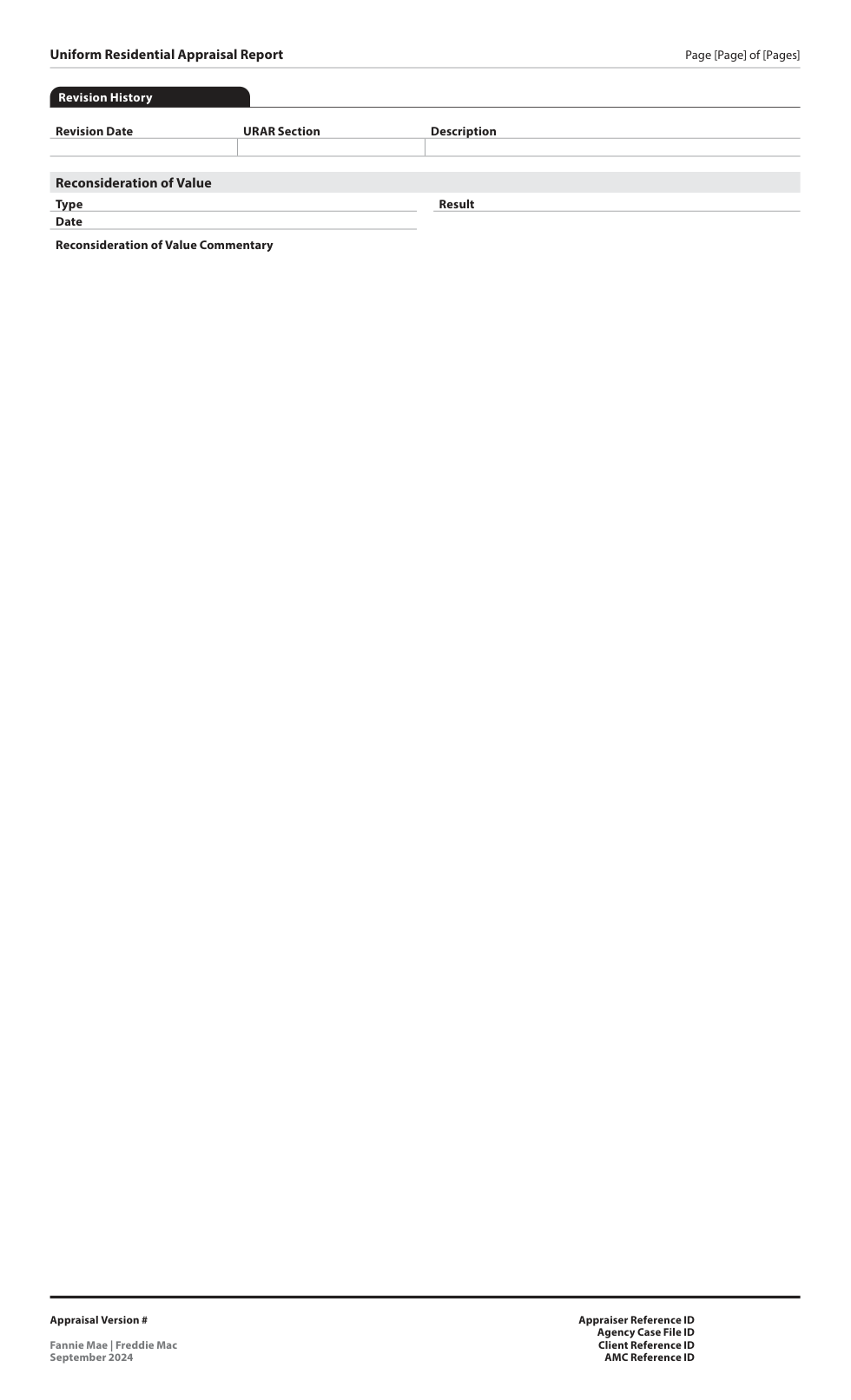
Revision History provides a named place for the appraiser to record report changes, with a separate subsection for borrower-initiated reconsiderations of value when applicable.
Close-up 1 / 2

The Revision History table displays when the appraiser documents revisions to the report, including changes resulting from a borrower-initiated ROV. Naming the affected section gives reviewers a direct starting point for understanding what changed and where to look next.
Explore field 27.002 F-1 · Revision History Table ↗Close-up 2 / 2

When a borrower-initiated ROV has been submitted on the original report, the ROV subsection records its type, completion date, result, and commentary. The result identifies whether the opinion of market value changed. Specific report changes belong in the Revision History table above.
Explore field 27.005 F-1 · Reconsideration of Value ↗Read the logged revision, visit the affected section, and confirm the explanation and value conclusion are consistent. This is a documented history, not an automatic field-by-field software diff.
A reviewer could compare report versions and accompanying communications to understand changes to the legacy appraisal.
A comparison of reporting structure. No direct legacy excerpt is shown for this topic.
The report itself can identify the revision date, affected section, and description, with an ROV outcome when the relevant conditions apply.
Step back. See the connections.
The gain is in the connections: a feature, its condition, its impact, and the explanation. Open a page to follow those connections in the interactive guide.
Pages from the official blank layout. The completed report expands to fit the property and assignment. Explore Appendix C-1 ↗
From limited production to retirement of the legacy format. These dates describe the GSE transition; agency-specific adoption plans may differ. [4]
Participating lenders begin using UAD 3.6 with GSE support. [8]
The broader industry transition opens. [9]
The mandate is based on the initial UCDP submission date. Sellers needing more time must obtain an exception from each applicable GSE. [4]
For UAD 2.6 reports under the exception, collateral risk scores become 999 at Fannie Mae and 99 at Freddie Mac; collateral representation-and-warranty relief for value is unavailable. [9]
The exception period ends May 19. Through June 27, UAD 2.6 is limited to resubmissions of previously submitted reports. [9]
Legacy submissions and resubmissions are no longer accepted. [9]
The September 30, 2026 update supersedes earlier transition timelines. Consult the current GSE timeline ↗ and Fannie Mae’s exception terms ↗ for operational decisions.
05 / What comes next
Follow a property characteristic into its supporting detail, explanation, and evidence.
Build review workflows around defined data and reporting conditions.
Prepare for more detailed observations and a report that adapts to the assignment.
Our interpretation of the reporting changes—not a promise of faster appraisals, automatic approval, or reduced risk.
Get The Signal, ValuSignal’s free monthly briefing.
Subscribe at ValuSignal ↗March 2005 form dates and UAD version markings.
Original UAD scope, standardization, effective dates, and UCDP.
Redesign history, MISMO alignment, and official appendices.
Dynamic reporting, commentary, compliance APIs, and mandate scope.
ADU interiors, defect reporting, and specific changes from 2.6.
Dwelling condition and quality: SB4-1.3-06.
Disaster Mitigation and Energy Efficient and Green Features; official F-1 guidance and A-1 definitions linked in each field.
Start of limited production.
Broad production, mandate, exception periods, and June 2027 retirement.
Field-level requirements and reporting conditions. Each close-up links to its relevant guidance page.
The official blank layout used for all sixteen close-ups. Report page 1 begins on PDF page 3.
Independent educational resource. Report imagery is drawn from the official legacy form and Appendix C-1; copyright Fannie Mae and Freddie Mac. The blank layout shows where information is reported; conditional sections do not appear in every completed appraisal. Teal focus outlines are editorial annotations. Requirements remain governed by the applicable GSE documentation.